Robotics System Components: Processors and Microchips
From the Robotics curriculum
TL;DR
Processors and microchips are the "brains" of a robot, executing instructions to make it function. They range from simple microcontrollers for specific tasks to powerful CPUs for complex operations. Understanding their types and how they work is crucial for designing and building effective robots.
1. The Mental Model
Think of a processor as the robot's brain, and microchips as the individual nerve cells and small organs that handle specific jobs. The brain tells the body what to do, and the nerve cells carry those messages and perform local functions.
2. The Core Material
Processors and microchips are fundamental to a robot's ability to sense, think, and act. They convert electrical signals into actions by following programmed instructions.
2.1 Microcontrollers (MCUs)

Photo by Lisha Dunlap on Pexels
These are small, self-contained computers on a single chip. They're designed for dedicated tasks and are very common in embedded systems, including many robots. An MCU typically includes a processor core, memory (RAM and flash for programs), and input/output (I/O) peripherals all in one package. They're great for controlling motors, reading sensor data, and simple decision-making. Think Arduino boards – they're built around microcontrollers.
2.2 Microprocessors (CPUs)
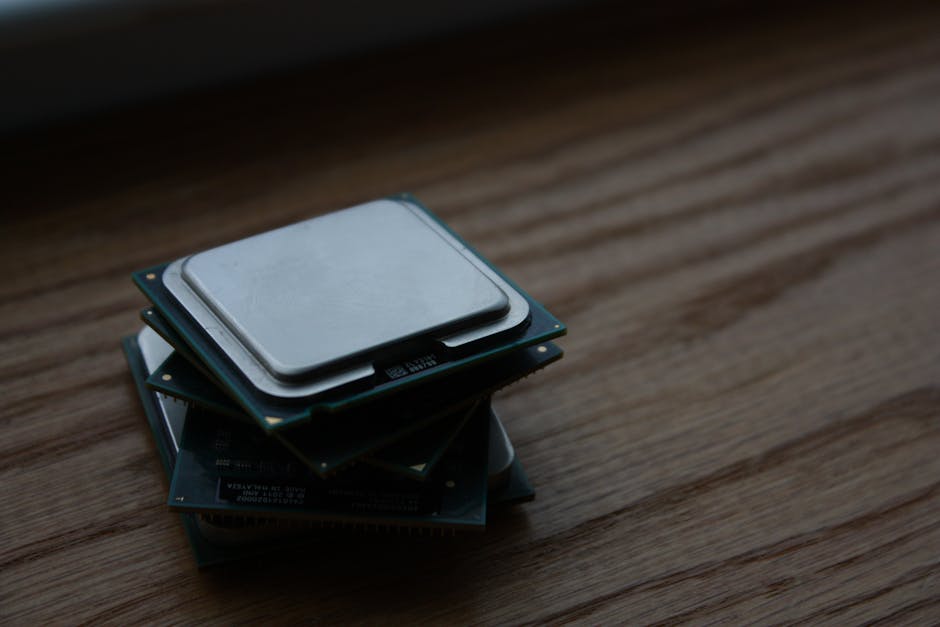
Photo by Shawn Stutzman on Pexels
A CPU is the central processing unit, the main brain, but it usually doesn't include memory or peripherals on the same chip. It needs external chips for those functions. CPUs are much more powerful than MCUs and are used when a robot needs to perform complex computations, run an operating system (like Linux), process vision data, or handle advanced AI algorithms. Raspberry Pi boards, for example, use microprocessors.
2.3 Digital Signal Processors (DSPs)

Photo by Alena Sharkova on Pexels
DSPs are specialized microprocessors optimized for performing mathematical operations on digital signals quickly. They are excellent for tasks like audio processing, image filtering, and motor control where real-time signal analysis is critical. While not always a standalone "brain," they often augment a main CPU or MCU for specific high-speed tasks.
2.4 Field-Programmable Gate Arrays (FPGAs)

Photo by Pixabay on Pexels
FPGAs are integrated circuits that can be configured by you after manufacturing. Unlike a CPU or MCU which has a fixed architecture, an FPGA's internal logic can be rewired to perform specific functions in parallel. This makes them incredibly fast for certain tasks, especially when you need custom hardware acceleration for things like high-speed sensor data processing or custom control loops that can't tolerate the latency of a traditional processor.
Here's a diagram showing how these different components might relate in a robotic system:
graph TD
    A["Robot Task Requirements"] --> B{"Choose Processing Unit"};
    B -- "Simple, Dedicated Control" --> C["Microcontroller (MCU)"];
    B -- "Complex Computation, OS, AI" --> D["Microprocessor (CPU)"];
    B -- "Real-time Signal Processing" --> E["Digital Signal Processor (DSP)"];
    B -- "Custom Parallel Hardware" --> F["FPGA"];

    C --> G["(e.g., Motor Control, Sensor Reading)"];
    D --> H["(e.g., Navigation, Vision, High-level AI)"];
    E --> I["(e.g., Motor Feedback Loops, Audio/Image Filtering)"];
    F --> J["(e.g., Custom Sensor Interface, Low-latency Control)"];

    D -- "May use" --> E;
    D -- "May use" --> F;
    C -- "Can communicate with" --> D;
2.5 Memory and Storage
No processor works alone.
* RAM (Random Access Memory): This is temporary, fast memory used by the processor to store data and instructions it's actively working on. When the robot turns off, RAM clears.
* ROM (Read-Only Memory)/Flash Memory: This is non-volatile memory where the robot's permanent program (firmware) is stored. It retains its contents even when power is off. Microcontrollers often have flash built-in; microprocessors use external flash or hard drives/SD cards for their operating system and applications.
3. Worked Example
Let's consider a simple mobile robot that needs to follow a line and avoid obstacles.
-
Line Following: The robot uses an array of infrared (IR) sensors to detect a black line on a white floor. A microcontroller (MCU) like an ATmega328P (found on an Arduino Uno) is perfect for this. It reads the analog values from the IR sensors, processes them to determine the line's position, and then calculates the appropriate motor speeds to keep the robot centered on the line. The MCU's built-in flash memory stores the line-following algorithm, and its RAM holds the current sensor readings and motor commands.
-
Obstacle Avoidance: If the robot also has ultrasonic sensors to detect obstacles, the MCU can be programmed to read these sensors too. When an obstacle is detected, the MCU temporarily overrides the line-following logic, commands the motors to stop or back up, and then turn until the path is clear before resuming line following. The MCU's direct control over I/O pins makes this real-time response efficient.
This setup wouldn't typically need a full microprocessor or FPGA unless the obstacle avoidance involved complex 3D mapping or deep learning, which would then require a more powerful CPU-based system (like a Raspberry Pi) to manage those higher-level tasks while still potentially letting the MCU handle the low-level motor control.
4. Key Takeaways
- Processors and microchips are the core "brains" of any robot, executing instructions.
- Microcontrollers (MCUs) are single-chip computers ideal for dedicated, real-time control tasks.
- Microprocessors (CPUs) are more powerful, requiring external memory, and are suited for complex computations and operating systems.
- DSPs excel at high-speed digital signal processing, often for specific tasks like motor control feedback.
- FPGAs offer custom hardware flexibility for parallel processing and low-latency operations.
- Memory (RAM for active data, Flash/ROM for programs) is essential for any processor to function.
- The choice of processor depends on the robot's complexity and the specific tasks it needs to perform.
Common Mistakes to Avoid:
* Over-specifying: Using an expensive, powerful CPU for a simple task that an MCU could easily handle, wasting resources and increasing complexity.
* Under-specifying: Expecting a basic MCU to run complex AI algorithms or process high-resolution video streams.
* Ignoring real-time constraints: Choosing a processor that can't meet the timing requirements for critical control loops (e.g., motor feedback).
* Forgetting about memory: Not allocating enough memory for your program and data, leading to crashes or poor performance.
5. Now Try It
Imagine you're designing a small drone that needs to maintain stable flight (using IMU data for attitude control) and also stream live video to a ground station. Which type of primary processing unit(s) would you consider for this and why? How would you distribute the tasks between different potential chips?
Think about:
1. What needs very fast, real-time control?
2. What needs significant processing power for data streams or a complex operating system?
3. Are there any specialized tasks that might benefit from a dedicated chip?
Outline your choices and reasoning in a few short paragraphs. You should be able to complete this thought exercise in about 15 minutes.
Frequently asked about Robotics System Components: Processors and Microchips
More from Robotics
Get the full Robotics curriculum
Clone the complete plan to your dashboard for unlimited AI-generated notes, practice quizzes, and a personalised revision schedule.
Save this course free