Introduction to IoT and its Ecosystem
From the IOT curriculum
Introduction to IoT and its Ecosystem
TL;DR
The Internet of Things (IoT) connects everyday physical objects to the internet, allowing them to send and receive data. This connection lets these "smart" objects sense their environment, communicate with each other, and perform actions. The IoT ecosystem is a layered system of devices, connectivity, data processing, and user applications that work together to make this possible.
1. The Mental Model
Imagine your everyday objects, like your coffee maker or your car, not just doing their usual job, but also being able to "talk" to each other and to you over the internet. IoT is about giving these objects digital voices and ears. They collect information, share it, and sometimes even act on it, all without you having to be right there.
2. The Core Material
IoT isn't just one thing; it's a whole system working together. Think of it as several layers built on top of each other, each with a specific role.
What is IoT?

Photo by Jakub Zerdzicki on Pexels
IoT stands for the Internet of Things. It refers to a network of physical objects embedded with sensors, software, and other technologies for the purpose of connecting and exchanging data with other devices and systems over the internet. These "things" can be anything from a smart thermostat in your home to industrial sensors in a factory.
The key idea is that these devices can:
* Sense: Collect data from their environment (e.g., temperature, light, motion).
* Communicate: Send this data over a network, often the internet.
* Act: Sometimes, they can also perform actions based on the data or instructions received (e.g., turn on a light, adjust a motor).
The IoT Ecosystem: Layers of Interaction
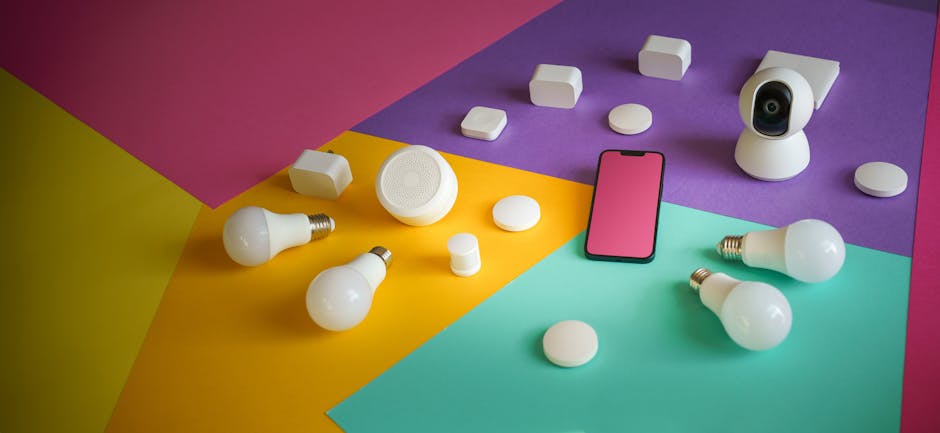
Photo by Jakub Zerdzicki on Pexels
The IoT ecosystem is typically described in layers, each performing different functions. Understanding these layers helps you see how everything fits together.
Here's a common way to visualize these layers:
graph TD
    A["User Application/Interface (e.g., Mobile App, Dashboard)"] --> B["Data Processing & Analytics (Cloud/Edge)"]
    B --> C["Network & Connectivity (e.g., Wi-Fi, Cellular, LoRaWAN)"]
    C --> D["IoT Devices/Sensors (e.g., Smart Thermostat, Wearable)"]
Let's break down each layer:
### Layer 1: IoT Devices/Sensors (The "Things")

Photo by Jakub Zerdzicki on Pexels
This is the foundation. These are the physical objects themselves. They are equipped with:
* Sensors: To gather data from the physical world (e.g., temperature, humidity, pressure, light, motion, GPS location).
* Actuators: To perform actions in the physical world (e.g., motors, lights, valves).
* Microcontrollers/Processors: Small computers that process sensor data and control actuators.
* Communication Modules: Radios or chips that allow the device to connect to a network (e.g., Wi-Fi module, Bluetooth module).
Example: A smart home bulb has an LED (actuator), a small processor, and a Wi-Fi chip to connect to your home network.
### Layer 2: Network & Connectivity
Photo by panumas nikhomkhai on Pexels
This layer is all about how the IoT devices communicate. Data collected by sensors needs a way to travel from the device to where it can be processed. There are many different connectivity options, each suited for different needs:
* Short-range: Bluetooth, Zigbee, Z-Wave (for devices close to each other, like in a smart home).
* Medium-range: Wi-Fi (common for home and office devices).
* Long-range: Cellular (4G, 5G), LoRaWAN, NB-IoT (for devices spread over large areas, like smart city sensors or asset trackers).
Example: Your smart bulb uses Wi-Fi to send its status (on/off, brightness) to your home router.
### Layer 3: Data Processing & Analytics (Cloud/Edge)
Once data leaves the device and travels over the network, it needs to be collected, stored, and analyzed.
* Cloud Platforms: Large-scale computing resources (like AWS IoT, Azure IoT, Google Cloud IoT) where data from many devices can be stored, processed, and analyzed. This is where most of the heavy lifting happens.
* Edge Computing: Processing data closer to where it's generated (at the "edge" of the network, e.g., on a local gateway device) instead of sending everything to the cloud. This is useful for reducing latency, saving bandwidth, and increasing privacy.
Example: The data from your smart bulb (on/off status, power consumption) is sent to a cloud server, which records it and can trigger automated rules.
### Layer 4: User Application/Interface
This is how people interact with the IoT system. It's the visible part that allows you to control devices, view data, and get insights.
* Mobile Apps: For controlling smart home devices or viewing personal health data.
* Web Dashboards: For monitoring industrial processes, fleet management, or smart city infrastructure.
* Voice Assistants: Like Alexa or Google Assistant, allowing voice control.
Example: You use a mobile app on your phone to turn the smart bulb on or off, or to set a schedule.
3. Worked Example
Let's consider a smart plant monitoring system.
-
IoT Device: You have a small sensor module (the "thing") stuck in your plant's soil. This module contains:
- A soil moisture sensor to detect how wet the soil is.
- A temperature sensor to measure ambient temperature.
- A small microcontroller (like an ESP32 or Arduino) to read these sensors.
- A Wi-Fi module to connect to your home network.
- A small battery for power.
-
Network & Connectivity: Every 15 minutes, the microcontroller reads the sensor data. It then uses its Wi-Fi module to connect to your home Wi-Fi router and sends this data (e.g., "moisture: 35%, temp: 22°C") to a cloud IoT platform over the internet.
-
Data Processing & Analytics: The cloud IoT platform (e.g., Adafruit IO, ThingSpeak) receives this data. It stores the moisture and temperature readings over time. You might set up a rule in the cloud that says, "If soil moisture drops below 20%, send an alert."
-
User Application/Interface: You open a mobile app on your phone. This app connects to the cloud platform and displays a graph of your plant's soil moisture and temperature history. If the moisture drops too low, the app pops up a notification saying, "Your plant needs water!"
This entire system works seamlessly to keep you informed about your plant's health, even when you're not home.
4. Key Takeaways
- IoT connects physical objects to the internet, enabling them to collect and exchange data.
- The IoT ecosystem consists of devices, connectivity, data processing, and user interfaces working in layers.
- Sensors gather information from the environment, while actuators perform physical actions.
- Various network technologies (Wi-Fi, cellular, LoRaWAN) link devices to the internet.
- Data collected by IoT devices is typically processed and stored in cloud platforms or at the network edge.
- User applications provide a way for you to interact with and control your IoT devices.
- IoT enables automation and data-driven insights for both personal and industrial use.
Common Mistakes to Avoid:
- Underestimating Security: Assuming IoT devices are inherently secure; many have weak security, making them vulnerable.
- Ignoring Connectivity Issues: Not considering network range, signal strength, or power consumption when choosing communication protocols.
- Overlooking Data Privacy: Not thinking about who owns the data, where it's stored, and how it's protected.
- Skipping Edge Cases: Designing only for ideal conditions and forgetting what happens when devices lose power or connectivity.
5. Now Try It
Pick a common household object (e.g., a refrigerator, a door lock, a window). Spend 15 minutes thinking about how you could make it "smart" using IoT principles.
What to do:
1. Identify what sensors or actuators it would need.
2. How would it connect to the internet (e.g., Wi-Fi, Bluetooth)?
3. What data would it collect or send?
4. Where would that data go (cloud/edge)?
5. How would you interact with it (e.g., a phone app, voice command)?
What success looks like:
You'll have a clear, step-by-step description of how your chosen object would function as an IoT device within the ecosystem layers we discussed. For instance, for a "smart window," you might say: "It needs a vibration sensor (for glass break detection) and a position sensor (open/closed). It would connect via Zigbee to a central hub, which then sends data to a cloud server. If vibration is detected, the cloud service sends an alert to my phone app."
Frequently asked about Introduction to IoT and its Ecosystem
Study this next
Get the full IOT curriculum
Clone the complete plan to your dashboard for unlimited AI-generated notes, practice quizzes, and a personalised revision schedule.
Create Free Account