Basic Functions and Structure of a Computer
From the organization curriculum
TL;DR
A computer takes in information, processes it using its main components, stores it, and then presents the results to you. Its core structure involves input/output, processing, memory, and storage, all working together through various connections. Understanding these basic functions helps you see how all your digital tasks happen.
1. The Mental Model
Think of a computer like a super-efficient office. It receives new tasks (input), figures them out (processes), remembers important details (memory), keeps long-term records (storage), and then shows you the finished work (output).
2. The Core Material
At its heart, every computer performs four fundamental functions: input, processing, output, and storage. Let's break down how these work and the main parts involved.
Input
Input is how you give information to the computer. This data can come from many places.
* Examples: Typing on a keyboard, clicking with a mouse, touching a touchscreen, speaking into a microphone, or even data coming from a network connection or a sensor.
* Input Devices: Keyboard, mouse, microphone, webcam, scanner, touchscreen.
Processing
This is where the computer does all the "thinking" and calculations. It takes the input data and transforms it into something useful.
* Central Processing Unit (CPU): Often called the "brain" of the computer. It executes instructions, performs arithmetic, and manages the flow of data. When you open an app, the CPU is doing most of the heavy lifting.
* Graphics Processing Unit (GPU): A specialized processor designed to handle parallel processing for tasks like rendering images, videos, and 3D graphics. Essential for gaming, video editing, and increasingly for artificial intelligence.
Output
Output is how the computer presents information back to you after processing.
* Examples: Displaying text or images on a screen, playing sounds through speakers, or printing a document.
* Output Devices: Monitor, printer, speakers, headphones.
Storage
Storage is about keeping data for later use. There are two main types:
* Primary Storage (RAM - Random Access Memory): This is your computer's short-term memory. It holds data and programs that the CPU is actively using right now. RAM is very fast but "volatile," meaning it loses its contents when the computer is turned off.
* Secondary Storage (Hard Drive/SSD): This is your computer's long-term memory. It stores data and programs permanently, even when the power is off. It's slower than RAM but much larger and non-volatile.
* Hard Disk Drives (HDDs): Traditional storage, using spinning platters.
* Solid State Drives (SSDs): Newer, faster storage using flash memory, with no moving parts.
The Computer's Structure: How Components Connect
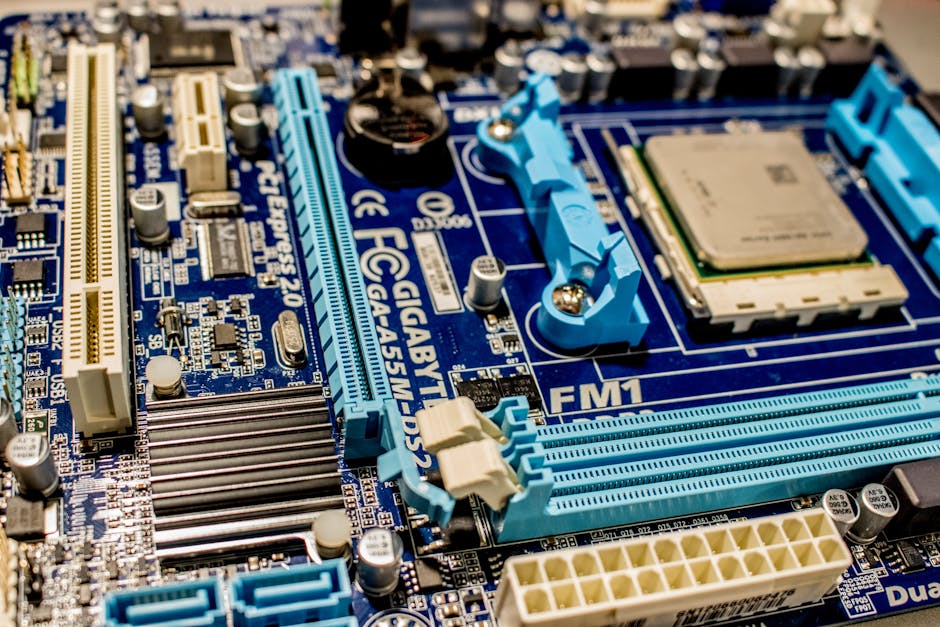
Photo by Jeremy Waterhouse on Pexels
These functions aren't isolated; they're all interconnected. The motherboard is the main circuit board that acts as the central communication hub, connecting the CPU, RAM, storage, and other components. The bus is a system of wires and connectors that allows data to travel between these components.
Here's a simple flow of how these components interact:
graph TD
    Input_Devices["Input Devices (Keyboard, Mouse, Mic)"] --> CPU["CPU (Central Processing Unit)"]
    CPU --> RAM["RAM (Random Access Memory)"]
    RAM --> CPU
    CPU --> Secondary_Storage["Secondary Storage (SSD, HDD)"]
    Secondary_Storage --> CPU
    CPU --> GPU["GPU (Graphics Processing Unit)"]
    GPU --> Output_Devices["Output Devices (Monitor, Speakers, Printer)"]
    Input_Devices --> Motherboard["Motherboard (Central Hub)"]
    Motherboard --> CPU
    Motherboard --> RAM
    Motherboard --> Secondary_Storage
    Motherboard --> GPU
    Motherboard --> Output_Devices
3. Worked Example
Imagine you're editing a photo.
1. Input: You use your mouse to open the image file from your SSD and make adjustments (like cropping or changing colors).
2. Processing: The CPU and GPU work together to render the image changes in real-time. The image data and editing software instructions are temporarily held in RAM so the CPU can access them quickly.
3. Storage (temporary): As you edit, changes are held in RAM. If you don't save, they're lost.
4. Output: You see the updated image on your monitor.
5. Storage (permanent): When you click "Save," the modified image data is written from RAM back to your SSD for long-term storage.
4. Key Takeaways
- Four Core Functions: All computers perform input, processing, output, and storage.
- CPU is the Brain: The Central Processing Unit (CPU) executes instructions and manages data flow.
- RAM for Short-Term Memory: Random Access Memory (RAM) holds data and programs currently in use; it's fast but temporary.
- SSD/HDD for Long-Term Storage: Solid State Drives (SSDs) and Hard Disk Drives (HDDs) store data permanently.
- Motherboard Connects Everything: The motherboard is the central board that allows all components to communicate.
- GPU for Graphics: The Graphics Processing Unit (GPU) is specialized for visual tasks and complex calculations.
- Buses Facilitate Data Flow: Buses are pathways for data communication between components.
Common mistakes to avoid:
- Confusing RAM (temporary) with SSD/HDD (permanent).
- Underestimating the GPU's role beyond just gaming, especially in modern computing.
- Thinking that an input device (like a keyboard) stores data long-term.
- Not understanding that the CPU and RAM work closely together during active tasks.
5. Now Try It
Think about using a voice assistant on your phone (like Siri or Google Assistant). Trace the path of your command through the computer's functions and core components. What acts as the input device? What component processes your speech? Where might your voice data be temporarily held? What is the ultimate output?
You'll know you've got it when you can clearly identify one specific component or function for each stage of the interaction, from speaking your command to getting a response.
Frequently asked about Basic Functions and Structure of a Computer
Study this next
Get the full organization curriculum
Clone the complete plan to your dashboard for unlimited AI-generated notes, practice quizzes, and a personalised revision schedule.
Save this course free